
One-click unsubscribe
See how Tantra adds RFC 8058 one-click unsubscribe headers and a public confirmation page so recipients can opt out and land on your suppression list.
Open in Tantra
These open the app in a new tab. You may be asked to sign in.
Overview
One-click unsubscribe lets a recipient opt out of your emails in a single action, without opening a browser or filling in a form. It follows the mail industry standard, RFC 8058, that Gmail and Yahoo require from bulk senders. Tantra adds the required headers to your campaign emails and hosts a public confirmation page for the footer link. When a recipient opts out, they are added to your suppression list for that sender and stop receiving your emails.
Honoring unsubscribes fast protects your sender reputation, which is why Tantra makes opting out effortless.
How it works
Tantra offers recipients two ways to opt out, and both end at the same place.
- The mailbox unsubscribe button. On campaign emails, Tantra adds standard
List-UnsubscribeandList-Unsubscribe-Postheaders. Gmail and Yahoo read these and show a native Unsubscribe link next to your sender name. When the recipient clicks it, their mail provider quietly tells Tantra to unsubscribe them. No page opens. - The footer link. Your email footer can carry an unsubscribe link. It opens a simple confirmation page with a Confirm unsubscribe button.
Both paths add the recipient to your suppression list for that sender and mark their place in the sequence as unsubscribed, so no further steps are sent.
Each unsubscribe link carries a signed token that identifies the recipient and sender. The link is single purpose and cannot be edited to unsubscribe someone else. Footer unsubscribe links stay valid for 90 days after send.
The headers Tantra adds
For a campaign email, Tantra adds:
List-Unsubscribe, containing both a mailto address and a secure web link.List-Unsubscribe-Post, set to signal one-click support.
These two together are what trigger the native Unsubscribe link in Gmail and Yahoo.
Manual one-to-one replies you send from the inbox deliberately do not carry these headers. A personal reply should read as a normal conversation, not as bulk mail, so it is never labeled with an unsubscribe control.
The public confirmation page
The footer link opens a plain confirmation page hosted by Tantra. It works even in strict mail clients and is not indexed by search engines.
- Before confirming, it reads Unsubscribe from emails and shows a Confirm unsubscribe button.
- While submitting, the button reads Confirming...
- On success, it reads You've been unsubscribed and confirms the address was added to the suppression list for that sender.
- If something goes wrong, it reads We couldn't process this request and offers a Try again button.
- If the link is malformed, it shows This unsubscribe link is invalid or expired.
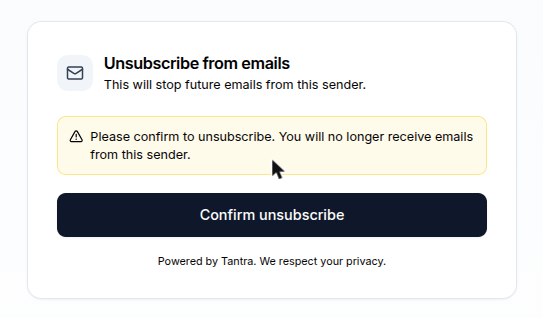
What happens next
An unsubscribe takes effect immediately.
- The recipient's address is added to your suppression list for that sender. Future sends to that address are skipped.
- Their enrollment in the sequence is marked unsubscribed, so no more steps go out.
- The action is recorded on your unsubscribe list. Mail-provider opt-outs are labeled as one-click, and footer-page opt-outs are labeled as a link click.
You can review opt-outs on the Unsubscribe page. See suppression lists and unsubscribes.
Unsubscribing is idempotent. If a recipient opts out twice, the second attempt is a no-op. Tantra also never reveals whether a token is valid, so a bad link still shows a neutral result rather than leaking information.
Best practices
- Keep the unsubscribe footer enabled on cold email so recipients always have a clear way out. It protects your reputation and reduces spam complaints.
- Do not treat an unsubscribe as a failure. A clean opt-out is better for your domain than a spam report.
- Never email an address again after it lands on your suppression list. Tantra enforces this on the send path, and honoring it manually keeps your lists clean.
Common mistakes
- Assuming a personal reply carries an unsubscribe link. It does not, by design. Only campaign emails do.
- Expecting to re-subscribe a recipient yourself. A recipient who wants back in must ask the sender to remove them from the suppression list.
- Confusing the suppression list with a bounce list. Unsubscribes are recipient choices, recorded separately from delivery failures.
Troubleshooting
| Symptom | Cause | Fix |
|---|---|---|
| No Unsubscribe link appears in Gmail | The message was a manual reply, or the campaign footer was off | Send through a campaign with the unsubscribe footer enabled. Manual replies never carry the header. |
Confirmation page shows This unsubscribe link is invalid or expired. | The token was malformed or the footer link is older than 90 days | Ask the recipient to use the most recent email, or add the address to your suppression list manually. |
| Page shows We couldn't process this request | A temporary error reaching Tantra | Use Try again. The action is safe to repeat. |
| A recipient still received a later step after opting out | The opt-out landed after that step was already queued | Confirm the address now appears on the suppression list. It blocks future sends. |
FAQ
What is RFC 8058? It is the mail standard for one-click unsubscribe. Gmail and Yahoo require it from bulk senders, and Tantra implements it on campaign emails.
Does the recipient need to open a browser? No. The mailbox Unsubscribe link opts them out without opening a page. The footer link opens a confirmation page for those who prefer it.
Where does an unsubscribed recipient go? Onto your suppression list for that sender. Future emails to that address are skipped.
Can a recipient re-subscribe themselves? No. They must contact the sender and ask to be removed from the suppression list.
Do manual replies include an unsubscribe link? No. Only campaign emails carry the one-click headers and footer link.
How long is a footer unsubscribe link valid? 90 days after the email is sent.
Related articles
Was this article helpful?
Related articles
- Suppression lists and unsubscribesBlock emails, domains, TLDs, and role mailboxes so Tantra never sends to them, and see how unsubscribes and bounces are suppressed automatically.
- Why Tantra does not track email opensTantra deliberately does not use open tracking pixels. Learn why, and how clicks, replies, and unsubscribes give you honest engagement signals.