
Warm up your sending mailboxes
Warm up new Gmail mailboxes in Tantra with a gradual peer-to-peer ramp that builds sending reputation before you run cold email at volume.
Open in Tantra
These open the app in a new tab. You may be asked to sign in.
Overview
Warmup gradually builds a mailbox's sending reputation before you use it for cold email at volume. Tantra warms a mailbox by sending a small, growing number of low-key emails between your own mailboxes and quietly marking them read. Mailboxes that send steadily and get engagement look trustworthy to inbox providers, which helps your real campaigns land in the inbox.
How it works
Warmup is peer-to-peer. A mailbox in warmup sends short, mundane emails to your other warmed mailboxes, which automatically mark them as read so they do not clutter those inboxes. The volume ramps up over time.
- Starting volume: 5 emails per day.
- Ramp: the daily volume rises by 5 every 3 days.
- Target: it keeps climbing until it reaches the mailbox target, which defaults to 100 per day.
Warmup needs a pool to send into. You need at least 2 warmed, connected, Gmail-capable mailboxes for warmup to do anything. With fewer, there is no peer to send to and warmup does nothing.
Warmup traffic is counted separately from your campaigns. It does not consume a mailbox's daily or hourly campaign caps, so warming a mailbox never starves your real sends of quota.
The warmed pool and the warm status
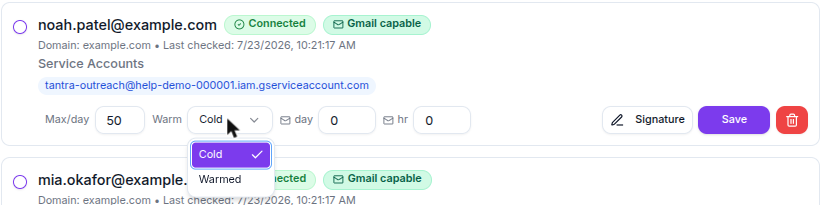
On the Accounts page, each connected mailbox has a status you can set to Warmed or Cold, both on a single row and in the bulk update panel.
Marking a mailbox Warmed adds it to the pool that warmup emails are sent into. It also shows a Warmed badge when you pick senders in the sequence builder, so you can tell which mailboxes are established. Marking a mailbox Cold removes it from that pool.
Starting and stopping the automated ramp for a specific mailbox is handled by Tantra's warmup controls, which set a target and begin the ramp, or stop it. The Accounts page today exposes the Warmed and Cold status described above rather than a dedicated start button.
Before you start
- Connect and verify the mailboxes you want to warm. They must be Gmail-capable and connected. See Add and verify your senders.
- Have at least 2 warmed, connected, Gmail-capable mailboxes so warmup has peers to send between.
What happens next
Once a mailbox is in warmup, Tantra sends its warmup emails on a schedule and raises the daily volume as the ramp progresses. You do not need to watch it day to day. The ramp climbs by 5 every 3 days until it reaches the target, then holds there. Because warmup uses its own budget, your campaigns keep sending against their own caps at the same time.
Give a new mailbox time on the ramp before you point large campaigns at it. Pair warmup with healthy authentication records. See Domain health reports.
Best practices
- Warm every new mailbox before its first real campaign.
- Keep several mailboxes warmed so the peer pool stays healthy and warmup has somewhere to send.
- Raise campaign caps slowly as a mailbox warms, rather than jumping straight to high volume. See Sending windows and daily limits.
- Fix SPF, DKIM, and DMARC issues in parallel. Warmup helps reputation, but authentication problems undercut it.
Common mistakes
- Warming a single mailbox alone. With fewer than 2 warmed mailboxes there is no peer to send to, and warmup does nothing.
- Sending at full volume on day one. A brand-new mailbox pushed hard can land in spam. Let the ramp build first.
- Ignoring authentication. Warmup does not fix a failing DKIM or DMARC record.
Troubleshooting
| Symptom | Cause | Fix |
|---|---|---|
| Warmup does not seem to send | Fewer than 2 warmed, connected, Gmail-capable mailboxes. | Mark at least 2 mailboxes Warmed on the Accounts page. |
| A mailbox is not offered as a warm peer | It is set to Cold, disconnected, or not Gmail-capable. | Set it Warmed and confirm it is connected and Gmail-capable. |
| Reputation still looks weak after warmup | Authentication records are failing. | Check Domain health reports. |
| Campaign sends slowed after starting warmup | Unrelated. Warmup uses a separate budget. | Check your campaign caps and window in Sending windows and daily limits. |
FAQ
Where do the warmup emails go? To your other warmed mailboxes. Tantra marks them read so they do not fill those inboxes.
Does warmup use up my campaign sending limit? No. Warmup is tracked separately and does not count against a mailbox's daily or hourly campaign caps.
How fast does volume grow? It starts at 5 per day and rises by 5 every 3 days, up to the target, which defaults to 100 per day.
How many mailboxes do I need? At least 2 warmed, connected, Gmail-capable mailboxes.
What does marking a mailbox Warmed do? It adds the mailbox to the warmed pool that warmup emails are sent into, and shows a Warmed badge in the sender picker.
Is warmup a substitute for good authentication? No. Keep SPF, DKIM, and DMARC healthy alongside warmup.
Related articles
Was this article helpful?
Related articles
- Sending windows and daily limitsControl when Tantra sends cold email with a sending window, and cap volume per mailbox with enforced daily and hourly limits.
- Domain health reports (SPF, DKIM, DMARC)Understand how Tantra scans your sender domains daily for SPF, DKIM, DMARC, and blocklist problems, and how to read the health status and score.