
Sequence steps, delays, and personalization modes
Configure cold email steps in Tantra, set delays between them, choose template or AI personalization, and control reply threading.
Open in Tantra
These open the app in a new tab. You may be asked to sign in.
Overview
A sequence is an ordered list of steps. Each step is one email. Step 1 is sent when a contact enrolls. Every step after it waits a set number of days, then sends, usually as a reply on the same thread. This article covers the step editor in the sequence builder.
How it works
Each step stores a subject, a body, a delay, a reply-threading choice, and a personalization mode. When a step is due, Tantra renders it for the recipient and sends it. Template steps render at send time. AI steps are prepared ahead of the send.
Step-by-step
Open Step 4, Sequence, in the builder. You start with one step. Use Add step to append more, and the up and down arrows to reorder.
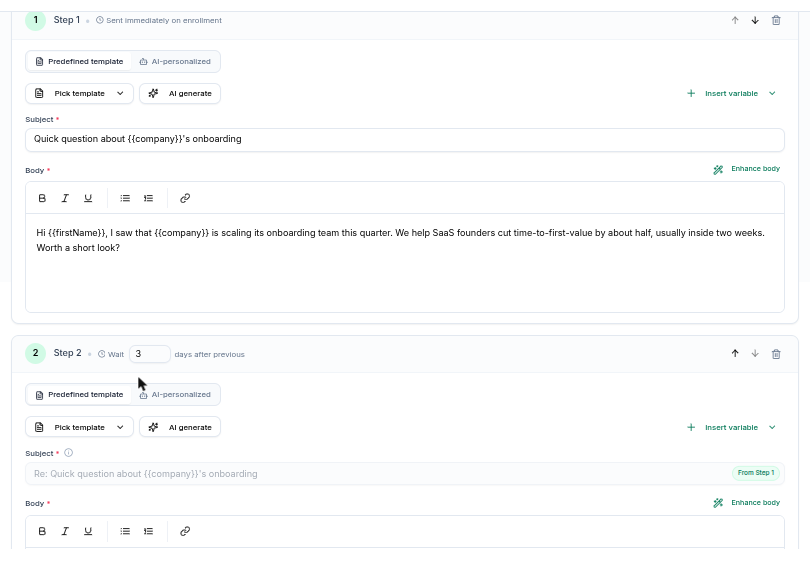
Set the delay
Step 1 always shows Sent immediately on enrollment and has no delay. Every later step shows a Wait input measured in days after previous. Allowed values are 0 to 365. If you reorder a step into the first position, its delay resets to 0 automatically.
Write the subject and body
Add a Subject and a Body. Both are required. The body is a rich text editor. Use Insert variable to drop merge fields into whichever field you last edited.
Available merge fields are:
{{firstName}}{{lastName}}{{fullName}}{{email}}{{company}}{{title}}{{website}}
Merge fields fill in per recipient. Any field with no value renders as empty text, so write copy that reads well even if a field is blank. Spintax like {a|b|c} picks one option per recipient. For the full syntax, see Merge tags and spintax.
You can also start from a saved template with Pick template, or draft copy with AI generate and refine it with Enhance body.
Choose reply threading
For steps after the first, a checkbox reads Send as a reply on the original thread. When it is on, the step sends as a reply in the same Gmail thread as step 1, and the subject locks to the step 1 subject with a Re: prefix. This keeps the conversation in one thread.
Gmail only threads replies whose subject matches the original. To edit the subject on a later step, turn this checkbox off. That step then sends as a separate email thread.
Pick a personalization mode
Each step has a mode toggle:
- Predefined template. The subject and body you wrote are sent as-is, with merge fields and spintax filled in.
- AI-personalized. For each recipient, the model rewrites your subject and body using text scraped from the recipient's website. Your subject and body act as the seed.
In AI mode you get extra controls:
- Fall back to template if AI can't bring proper data. On by default. When the recipient's site cannot be scraped or the model fails, Tantra sends your written subject and body instead, so the sequence never stalls. Turn it off only if you would rather skip the send than send a non-personalized message.
- Extra instructions for the AI. Optional guidance added on top of the base prompt. It steers the body, not the subject. Up to 4000 characters.
- Test against a contact. Enter a test email or domain to preview how the step personalizes. For how personalization and scraping work, see AI personalization for email and calendar.
Recipients on personal email domains, such as gmail.com or outlook.com, skip AI and receive the template as-is.
Field reference
| Field | Rules |
|---|---|
| Delay (days after previous) | 0 to 365. Step 1 is always 0. |
| Subject | Required. Up to 998 characters. |
| Body | Required. |
| Send as a reply on the original thread | Steps after the first. On by default. Locks subject to Re: of step 1. |
| Personalization mode | Predefined template or AI-personalized. |
| Fall back to template | AI mode only. On by default. |
| Extra instructions for the AI | AI mode only. Up to 4000 characters. Affects the body. |
What happens next
When a step becomes due, the scheduler runs it on its next pass, about once a minute, but only inside your sending window and only if the mailbox has quota. For a template step, Tantra renders the copy at send time. For an AI step, Tantra prepares the personalized copy first, then sends on a later pass once it is ready.
After a step sends, the enrollment advances to the next step and its next send time is set by that step's delay. When the last step sends, the enrollment is marked completed. See Enrollment lifecycle and statuses.
A/B testing
The A/B testing control in Step 5 is marked Phase 3 and is disabled. Variant-level subject and body experiments are not yet available. For now, build a single version of each step.
Best practices
- Keep step 1 short. Long opening emails lower reply rates.
- Space follow-ups a few days apart rather than sending daily.
- Leave Fall back to template on so a scrape failure never stalls the sequence.
- Preview an AI step with Test against a contact before you launch.
Common mistakes
- Editing a locked subject. If the subject is greyed out with a From Step 1 tag, the step is threading a reply. Turn off reply threading to edit it.
- Relying on a merge field that is often empty. If many contacts lack a company,
{{company}}renders blank. Write around it. - Expecting A/B variants. That feature is not available yet.
Troubleshooting
| Symptom | Cause | Fix |
|---|---|---|
Step N: subject is required. | The step has no subject. | Add a subject, or turn on reply threading to inherit the step 1 subject. |
Step N: email body is required. | The step body is empty. | Add body text. |
| A later step arrives as a new thread | Reply threading is off for that step. | Turn on Send as a reply on the original thread. |
| A merge field prints nothing | The contact has no value for that field. | Use a field most contacts have, or restructure the sentence. |
| AI step sent the plain template | The site could not be scraped, so fallback ran. | Expected when fallback is on. See AI personalization. |
FAQ
How many steps can I add? Up to 65 steps in one sequence.
What is the longest delay? 365 days per step.
Does step 1 ever wait? Step 1 has no delay, but it still respects your sending window and mailbox caps, so it sends on the next scheduler pass inside the window.
Can different steps use different personalization modes? Yes. Set the mode per step. Some can be templates and others AI-personalized.
Are opens tracked to pick a follow-up? No. Tantra does not track opens. Follow-ups are timed by your delays and stopped by replies.
Related articles
Was this article helpful?
Related articles
- Build an email sequenceUse Tantra's six-step wizard to build a cold email sequence, pick senders and audience, set limits, and launch or schedule your campaign.
- AI personalization for email and calendarTantra rewrites your email and calendar copy per recipient using their website. Turn it on per step or campaign, with template fallback.
- Merge tags and spintaxPersonalize outreach in Tantra with merge tags like firstName and company, and add spintax variants that stay stable per recipient.