
Enrollment lifecycle and statuses
Understand how a contact moves through a Tantra cold email sequence, what each enrollment status means, and how to manage enrollments.
Open in Tantra
These open the app in a new tab. You may be asked to sign in.
Overview
An enrollment is one contact's journey through a sequence. Each contact you add to a campaign gets one enrollment, which tracks their current step, their next send time, and their status. This article explains the statuses and how to manage enrollments from the campaign page.
How it works
When a campaign starts, Tantra creates an enrollment for each eligible contact and sets the first send time. A scheduler checks about once a minute for enrollments that are due, then hands each one to the send path. After a step sends, the enrollment advances to the next step and its next send time moves ahead by that step's delay. When the last step sends, the enrollment completes.
Enrollments are de-duplicated by email address, so a contact who appears on two selected lists is enrolled once.
Enrollment statuses
An enrollment is always in one of these statuses:
| Status | Meaning | How it is reached |
|---|---|---|
active | Moving through the sequence. | Set at enrollment and after each step advances. |
paused | Frozen. Not picked up by the scheduler. | You pause the campaign, which freezes its active enrollments. |
completed | Reached the end of the sequence or was stopped at the end. | The last step sent, or you stopped it at the final step. |
replied | The recipient replied, so the sequence stops. | A reply is detected on the thread. |
bounced | Delivery failed, so no more steps are sent. | A hard bounce, or the recipient is on the bounce suppression list. |
unsubscribed | The recipient opted out, so no more steps are sent. | An unsubscribe, or the recipient is on your do-not-contact list. |
failed | The sequence could not continue. | A permanent send problem, or a missing step or sender. |
Once an enrollment reaches replied, bounced, unsubscribed, completed, or failed, it is finished and no further steps send. A paused enrollment is only frozen and resumes when you resume the campaign.
How replies, bounces, and unsubscribes stop a sequence
Tantra checks for exit signals before and around every send:
- Reply. When a recipient replies, their enrollment moves to
repliedand stops. Read the reply in the inbox. For how replies are matched, see Reply detection and intent classification. - Unsubscribe or do-not-contact. If the recipient is on your unsubscribe or do-not-contact list, the next send is skipped and the enrollment moves to
unsubscribed. See Suppression lists and unsubscribes. - Bounce. A hard bounce moves the enrollment to
bouncedand adds the address to suppression, so future campaigns skip it too.
Managing enrollments
Open a cold email campaign and go to the Enrollments tab. It lists each recipient with their current step, status, and last sent time.
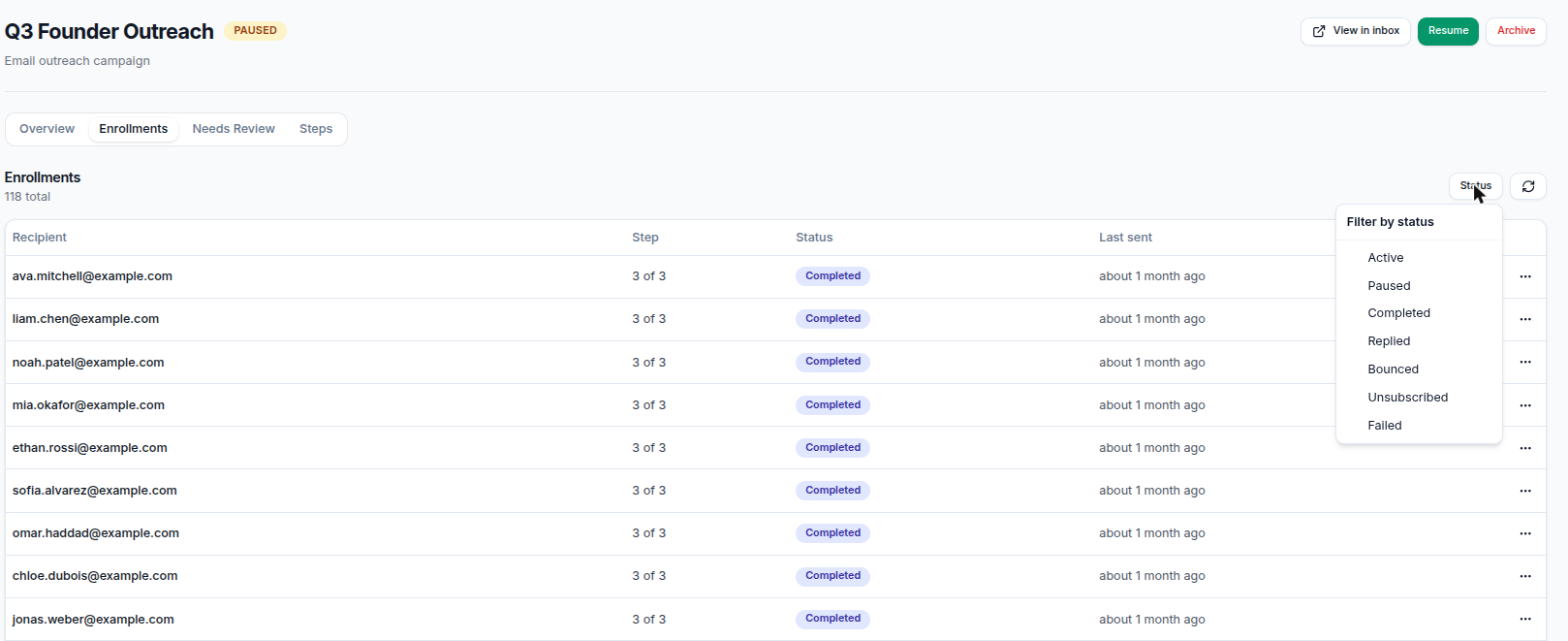
- Filter by status. Narrow the list to
active,paused,completed,replied,bounced,unsubscribed, orfailed. - Refresh. Reload the current list.
- Row actions. On an active enrollment you can Skip step, Resend step, or Stop enrollment. Each asks you to confirm.
Skip step moves the enrollment to the next step without sending the current one. If it was on the last step, it completes. Resend step re-sends the current step. Stop enrollment ends the sequence for that contact.
If the campaign page cannot load the enrollment list directly, it shows a read-only view built from your email threads, with an amber banner. In that fallback view the row actions are disabled.
Pausing and resuming the campaign
From the campaign header you can Pause an active campaign or Resume a paused one.
- Pause freezes every active enrollment. No steps send while paused.
- Resume thaws the frozen enrollments. Any that were already due send on the next scheduler pass.
What happens next
While a campaign is active, its enrollments advance on their own. Each due step sends within about a minute, provided the sending window is open and the mailbox has quota. As recipients reply, bounce, or unsubscribe, their enrollments leave active and settle into a final status. When every enrollment is finished, the campaign becomes completed.
Track progress on the Overview tab, which shows counts for enrolled, sent, clicked, replied, bounced, and unsubscribed. Opens are intentionally absent.
Best practices
- Check the
bouncedandfailedfilters after a large send to spot list quality problems early. - Use Stop enrollment rather than deleting a contact when you want to end outreach to one person.
- Pause the whole campaign if you need to fix copy, then resume.
Common mistakes
- Expecting a paused enrollment to resume itself. It stays frozen until you resume the campaign.
- Treating
bouncedas temporary. A hard bounce suppresses the address for future sends too. - Looking for an opened status. There is none. Tantra does not track opens.
Troubleshooting
| Symptom | Cause | Fix |
|---|---|---|
| Row actions are greyed out | The page is showing the read-only thread fallback. | Refresh. If it persists, the enrollment list could not load. |
| A contact never received later steps | They replied, bounced, or unsubscribed. | Check the enrollment status. This is expected behavior. |
An enrollment shows failed | A permanent send problem, or a missing step or sender. | Confirm the sender is connected and the steps exist, then re-enroll if needed. |
| An enrollment is stuck on active with no send | Outside the sending window or at a mailbox cap. | See Sending windows and daily limits. |
| Empty enrollments list | No contacts enrolled yet. | Start the campaign, or check the audience lists had contacts. |
FAQ
Can one contact be enrolled twice in the same campaign? No. Enrollments are de-duplicated by email address.
Does a reply always stop the sequence?
Yes. A detected reply moves the enrollment to replied and no further steps send.
What is the difference between paused and stopped? Paused enrollments are frozen and resume with the campaign. A stopped enrollment is finished and does not resume.
Why is a contact unsubscribed when they never clicked unsubscribe on this campaign?
They are on your unsubscribe or do-not-contact list from before, so the send was skipped.
Where do I see how many contacts replied? On the campaign Overview tab, in the funnel counts.
Related articles
Was this article helpful?
Related articles
- Build an email sequenceUse Tantra's six-step wizard to build a cold email sequence, pick senders and audience, set limits, and launch or schedule your campaign.
- Reply detection and intent classificationLearn how Tantra polls your mailboxes to detect replies, links them to the right campaign, and classifies each one with AI and a keyword fallback.
- Suppression lists and unsubscribesBlock emails, domains, TLDs, and role mailboxes so Tantra never sends to them, and see how unsubscribes and bounces are suppressed automatically.
- Understand your email analyticsRead the Email Analytics dashboard in Tantra. Learn what sent, clicked, replied, bounced, and unsubscribed mean and how fresh each number is.