
Set up a custom tracking domain
Add a CNAME subdomain, verify it, and set it as your default so tracked email links carry your own branding instead of the shared domain.
Open in Tantra
These open the app in a new tab. You may be asked to sign in.
Overview
A custom tracking domain routes your tracked email links through a subdomain you control, such as clicks.yourdomain.com, instead of Tantra's shared domain. A CNAME is a DNS record that points one hostname at another. You create a CNAME that points your subdomain at Tantra's tracking edge, verify it in Tantra, and set it as your default. After that, tracked links in your cold email carry your own branding.
If you do not set up a custom domain, Tantra automatically routes click tracking through its shared, signed domain. You can switch to a custom domain at any time without re-issuing existing campaigns.
Before you start
- Access to your DNS provider so you can add a CNAME record.
- A subdomain you control and are willing to dedicate to tracking, such as
clicks.yourdomain.com. - Click tracking is a cold email feature. Review how click tracking works first.
Step-by-step
- Open Connectors, then Custom Click-Tracking Domain.
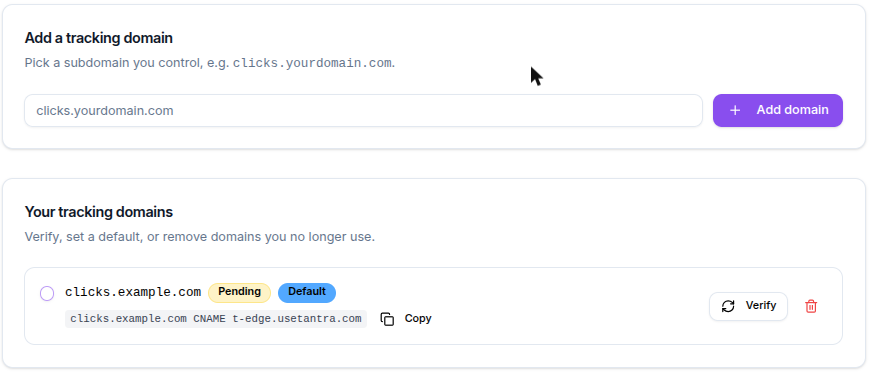
- In Add a tracking domain, type the subdomain you want to use, for example
clicks.yourdomain.com, then click Add domain. Enter only the hostname, with nohttps://prefix and no path. - The new domain appears under Your tracking domains with a Pending badge and shows the exact CNAME record to create.
- Click Copy to copy the record. It has the form
clicks.yourdomain.com CNAME t-edge.usetantra.com. - At your DNS provider, create that CNAME record. Point your subdomain at
t-edge.usetantra.com. - Wait a few minutes for DNS to propagate.
- Back in Tantra, click Verify on that domain. Tantra performs a live DNS lookup and compares your CNAME against the expected target.
- When the badge turns Verified, select the domain's radio button to set it as your default. New campaigns then wrap tracked links with this domain.
Screens and controls
The Custom Click-Tracking Domain page has four areas.
- Current default. Shows the verified domain new campaigns use, or a note that Tantra is using its shared tracking domain.
- Add a tracking domain. A hostname field and an Add domain button.
- CNAME setup. A first-time preview of the record to create. Once you add a domain, each row shows its own exact record.
- Your tracking domains. One row per domain with a status badge, the copyable CNAME record, a Verify button, a default selector, and a delete button.
Field reference
| Control | Purpose | Notes |
|---|---|---|
| Hostname | The subdomain to register | Hostname only. No scheme, port, or path. Up to 253 characters. |
| Add domain | Registers the subdomain in Tantra | The first domain you add becomes your default automatically. |
| Verify | Runs a live DNS check of your CNAME | Flips the status to Verified or Failed. |
| Status badge | Current state | Pending, Verified, or Failed. |
| Default selector | Chooses the active tracking domain | Available only after the domain is verified. |
| Copy | Copies the exact CNAME record | Format is your hostname, then CNAME, then t-edge.usetantra.com. |
| Delete | Removes the domain | Campaigns using it fall back to the shared tracking domain. |
Validation
The add form rejects invalid hostnames before submitting.
- An empty field shows
Hostname is required. - A value with a scheme or path shows
Enter only the hostname (no scheme or path). - A value over the length limit shows
Hostname is too long. - A malformed hostname shows
Use only letters, numbers, dots, and hyphens (e.g. clicks.example.com).
Each subdomain can belong to only one account across all of Tantra. If someone else has already registered the exact hostname, the add fails and Tantra reports that the hostname is already registered.
What happens next
Verification is immediate. Tantra resolves your CNAME live when you click Verify, so the result appears within a few seconds.
- If the record matches, the badge turns Verified and Tantra warms up the connection so the first real recipient click does not stall.
- If the record is missing or points elsewhere, the badge turns Failed and the row shows the reason, such as a DNS lookup code or a note that the CNAME target did not match.
DNS changes can take time to propagate. If verification fails right after you add the record, wait a few minutes and click Verify again. Once a domain is verified and set as default, new campaigns wrap tracked links with it. Existing campaigns are not re-issued.
Best practices
- Dedicate a subdomain used only for tracking, such as
clicks.orlinks., rather than your main website host. - Verify the domain before you launch a campaign so tracked links carry your branding from the first send.
- Keep one verified default. You can register more than one domain, but only one is the active default.
Common mistakes
- Entering a full web address instead of a hostname. Enter
clicks.yourdomain.com, nothttps://clicks.yourdomain.com. - Clicking Verify before DNS has propagated. Wait a few minutes after creating the CNAME, then retry.
- Pointing the CNAME at the wrong target. It must point at
t-edge.usetantra.com. - Trying to set an unverified domain as default. Verify it first. Tantra blocks this with
Verify the domain before setting it as default.
Troubleshooting
| Symptom | Cause | Fix |
|---|---|---|
| Verify shows Failed with a lookup code | The CNAME does not exist yet or has not propagated | Confirm the record at your DNS provider, wait a few minutes, then click Verify again. |
| Verify shows a CNAME mismatch | Your subdomain points at the wrong host | Update the CNAME to point at t-edge.usetantra.com and verify again. |
| Add fails saying the hostname is already registered | Another account owns that exact hostname | Choose a different subdomain you control. |
| Cannot set a domain as default | The domain is not verified | Verify it first. The error is Verify the domain before setting it as default. |
| Removed a domain by mistake | Deleting falls back to the shared domain | Re-add the subdomain and verify it again. |
FAQ
Do I have to use a custom tracking domain? No. Without one, Tantra routes click tracking through its shared, signed domain.
Where do my tracked links point after setup?
Through your verified default subdomain, for example clicks.yourdomain.com.
Can I register more than one domain? Yes, but only one can be the active default at a time.
What happens to running campaigns if I delete my domain? They fall back to Tantra's shared tracking domain. Nothing is re-issued.
Does the custom domain affect open tracking? Tantra does not track opens. The domain only affects click redirects and unsubscribe links.
Why did verification succeed but a link still looked like the shared domain? Only campaigns created after you set the domain as default use it. Existing campaigns keep the host they were built with.
Related articles
Was this article helpful?
Related articles
- How click tracking worksLearn how Tantra rewrites links, verifies signed click tokens, filters bot clicks, and shows unique click engagement in analytics.
- Domain health reports (SPF, DKIM, DMARC)Understand how Tantra scans your sender domains daily for SPF, DKIM, DMARC, and blocklist problems, and how to read the health status and score.