
How click tracking works
Learn how Tantra rewrites links, verifies signed click tokens, filters bot clicks, and shows unique click engagement in analytics.
Open in Tantra
These open the app in a new tab. You may be asked to sign in.
Overview
Click tracking tells you which recipients clicked a link in a cold email. Tantra measures engagement through clicks, replies, and unsubscribes. It does not use open tracking. To learn why, read why Tantra does not track opens.
When click tracking is on, Tantra rewrites the links in your email so each click passes through a signed redirect first. The redirect records the click, filters out automated clicks from security scanners, and then sends the recipient on to the real page. This article explains how that works and where to see the results.
How it works
Click tracking runs in three stages.
-
Link rewriting at send time. When a step has click tracking enabled, Tantra rewrites each
httpandhttpslink in the message body to point at a tracking redirect. Each rewritten link carries a signed token unique to that recipient and message. Links that are not web links, such asmailto:andtel:links, page anchors, and any link you mark to skip, are left untouched. -
The signed redirect. When the recipient clicks, their browser hits Tantra's tracking redirect. Tantra verifies the token's signature, confirms the destination web address has not been altered, and confirms the destination uses
httporhttps. If all checks pass, Tantra records the click and sends a302redirect to the original page. -
Bot filtering. Before a click counts toward your metrics, Tantra decides whether it came from a human or an automated scanner. Corporate security gateways pre-fetch every link in an inbound email within seconds of delivery, which creates phantom clicks. Tantra flags those and keeps them out of your click rate.
The signature uses a keyed hash, so a link cannot be forged or edited without Tantra rejecting it. Tracking links stay valid for 180 days after send.
What counts as a bot click
A click is treated as a bot or scanner click when either of these is true.
- The click lands less than 5 seconds after the email was sent. No human reads and clicks a cold email that fast, so an early click signals a security gateway pre-fetch.
- The browser identifier matches a known scanner or link-checker pattern. The built-in list covers common security gateways such as Microsoft Safe Links, Mimecast, Proofpoint, Barracuda, and Google's image proxy, plus scripted clients such as
curlandpython-requests.
Tantra keeps this pattern list current with a weekly refresh. Bot clicks are still recorded so you can audit them, but they do not raise your click count and do not trigger click webhooks.
Where the redirect sends recipients
Recipient experience always comes first. The redirect never shows an error page.
- On a valid click, the recipient lands on your original link.
- If the token is missing, expired, or tampered with, or if the destination is not a normal web link, the recipient is redirected to a safe Tantra page instead.
The click is still recorded even if the background write is briefly unavailable, and the recipient still reaches their destination.
How clicks become metrics
Your campaign click count uses unique clicks, not raw clicks.
- The first non-bot click by a given recipient raises that campaign's click count once.
- Later clicks by the same recipient are recorded as engagement history but do not raise the count again.
This gives you a unique click rate rather than an inflated total.
Turn click tracking on
Click tracking is a per-campaign setting on the email sequence you build. Turn it on when you create or edit an email campaign. When it is off, Tantra sends your links exactly as written and records no clicks for that campaign.
By default, tracked links route through Tantra's shared, signed tracking domain. You can route them through your own subdomain instead. See set up a custom tracking domain.
What happens next
A click is recorded within a few seconds of the recipient clicking. It then appears in your email analytics.
Open Email Analytics. You will see:
- A Unique Clicks tile with your click-through rate.
- A Recent Click Events panel that lists non-bot clicks with the time they occurred, the destination link, the tracking host that served the redirect, and the recipient's browser identifier. This list shows only non-bot clicks and pages 25 rows at a time.
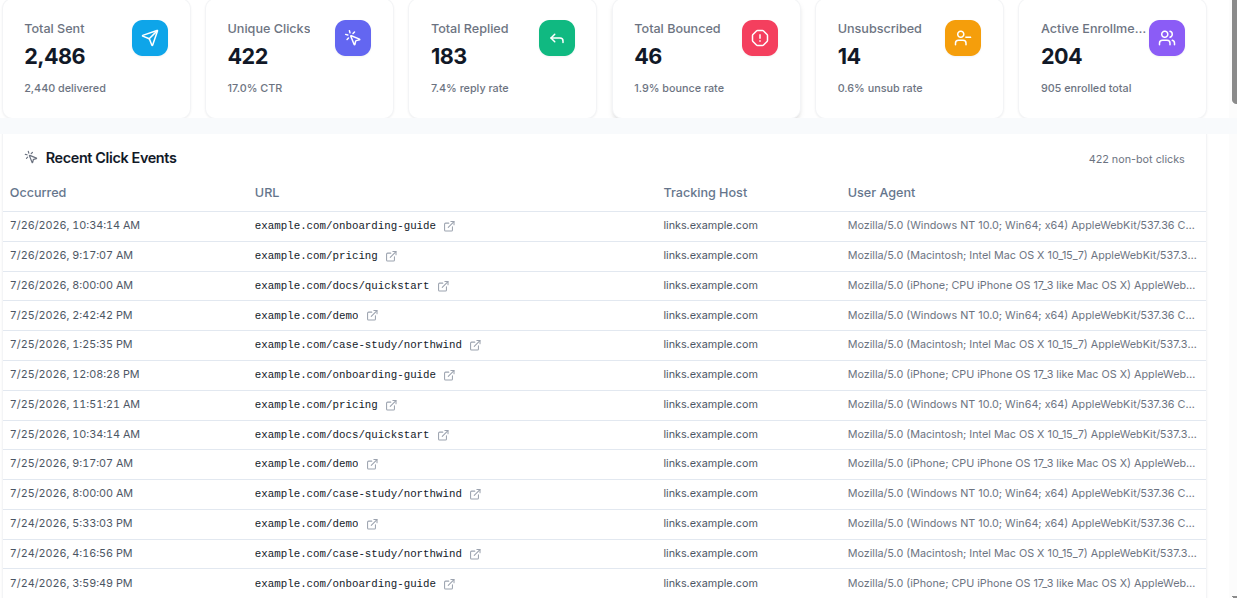
Field reference
| What you see | Meaning |
|---|---|
| Unique Clicks | Recipients who clicked at least one tracked link. Repeat clicks by the same recipient are not double counted. |
| Recent Click Events | A list of individual non-bot clicks. |
| Occurred | When the click happened. |
| URL | The original destination the recipient was sent to. |
| Tracking Host | The domain that served the redirect. This is your custom domain when set, otherwise Tantra's shared domain. |
| User Agent | The browser or client identifier reported at click time. |
Best practices
- Keep the number of links in a cold email small. One clear call to action reads as a personal note and clicks are easier to interpret.
- Use a custom tracking domain so tracked links carry your own branding. See set up a custom tracking domain.
- Read click rate alongside reply rate. A click with no reply still signals interest worth a follow up.
Common mistakes
- Expecting every recorded click to be a person. Security gateways generate automated clicks. Tantra filters these, which is why your unique click count can be lower than the raw number of redirect hits.
- Assuming a low click rate means low interest. Some recipients reply without clicking. Judge a campaign on clicks and replies together.
- Expecting open rates. Tantra does not track opens. See why Tantra does not track opens.
Troubleshooting
| Symptom | Cause | Fix |
|---|---|---|
| No clicks recorded for a campaign | Click tracking was off for that campaign, or the message had no web links | Turn on click tracking when you edit the campaign, and confirm the body contains http or https links. |
| Clicks appear seconds after send from many recipients | A security gateway pre-fetched the links | No action needed. Tantra flags clicks under 5 seconds as bot clicks and excludes them from your click count. |
| Click count lower than expected | Repeat clicks by the same recipient are counted once, and bot clicks are excluded | This is expected. Tantra reports unique, human clicks. |
| A recipient reached a Tantra page instead of your link | The tracking token was missing, expired, or altered in transit | Re-send from an active campaign. Tracking links expire 180 days after send. |
FAQ
Does click tracking change the link the recipient sees? The underlying link is rewritten to pass through a redirect. With a custom tracking domain, the visible host is your own subdomain.
Do bot clicks hurt my numbers? No. Bot clicks are recorded for auditing but are kept out of your click rate and do not fire webhooks.
How long do tracking links stay active? 180 days after the email is sent. After that the link redirects to a safe Tantra page.
Can someone forge a click link? No. Each link is signed and the destination is hash-checked. A forged or edited link is rejected and redirects to a safe page.
Why is my click count lower than the number of clicks I see reported elsewhere? Tantra counts unique human clicks. Repeat clicks and automated scanner clicks are excluded.
Does Tantra track opens too? No. Engagement is measured by clicks, replies, and unsubscribes only.
Related articles
Was this article helpful?
Related articles
- Set up a custom tracking domainAdd a CNAME subdomain, verify it, and set it as your default so tracked email links carry your own branding instead of the shared domain.
- Why Tantra does not track email opensTantra deliberately does not use open tracking pixels. Learn why, and how clicks, replies, and unsubscribes give you honest engagement signals.
- Understand your email analyticsRead the Email Analytics dashboard in Tantra. Learn what sent, clicked, replied, bounced, and unsubscribed mean and how fresh each number is.