
Plans, pricing, and managing your subscription
See your current plan, pick a billing period, and complete checkout through Dodo Payments to activate your Tantra subscription.
Open in Tantra
These open the app in a new tab. You may be asked to sign in.
Overview
Tantra runs on a paid subscription. You pick a plan, choose whether to pay monthly or yearly, and complete checkout. Payments are handled by Dodo Payments, the merchant of record, so Tantra never stores your card details.
This article covers viewing your current plan, choosing a plan and billing period, what happens when you check out, and where your subscription state shows up in the product.
How it works
There are two places that deal with plans:
- The public Pricing page at
/pricing. Anyone can view it, signed in or not. - The Billing and Subscription page at
/billing. This is where you see your current plan and start a checkout.
When you pick a plan and confirm, Tantra creates a checkout session with Dodo Payments and sends you to Dodo's hosted checkout page. You enter your card details there, not in Tantra. After payment, Dodo returns you to your billing page and notifies Tantra, which updates your subscription record.
Access to the main app is gated on an active subscription. If your subscription is not active or trialing, opening a protected page sends you to /billing so you can subscribe first.
Plans and prices
The public pricing page shows three tiers.
| Plan | Price | How you start it |
|---|---|---|
| Free | $0 | Start free button. Set up your account, connect a mailbox, import contacts, and explore both engines. |
| Pro | $99 per month, or $83 per month billed at $999 per year | Get started button, then checkout. |
| Enterprise | Custom | Talk to us button, which opens the contact form. Enterprise is a conversation, not a self-serve checkout. |
The Monthly and Annual toggle on the pricing page switches the Pro price between the monthly and yearly figures. Annual billing is presented as a saving of 16 percent versus paying monthly for a year.
Pro is described as unmetered. There is no per mailbox charge, no seat count, no contact list tier, and no per invite or per campaign fee. You connect your own AI provider key and pay that provider directly, so AI inference is not billed by Tantra.
The one limit Tantra does not set is a Google Workspace policy limit of 1500 recipients per mailbox per day. Tantra keeps every mailbox under that ceiling, and you can set lower daily and hourly caps yourself.
Before you start
- You need to be signed in to reach
/billingand to check out. On the pricing page, Get started sends you to/billingwhen you are signed in, or to sign up when you are not. - Checkout uses the name and email on your Tantra account. Make sure your account email is correct before you begin.
Step-by-step: choose a plan and check out
-
Open Billing and Subscription at
/billing. The page loads your current plan at the top.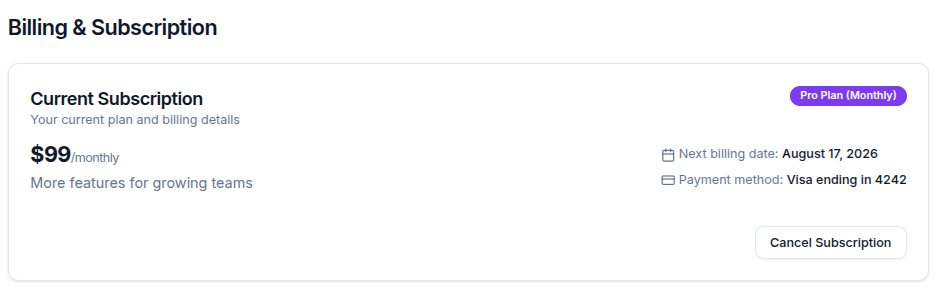
-
If you are on the Free plan, the card invites you to upgrade. Use the plan controls to select Pro.
-
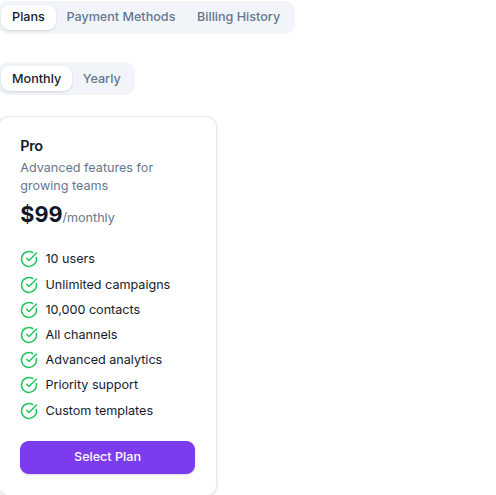
Choose your billing period. The Plans tab has Monthly and Yearly sub-tabs. Pick the one you want.
-
Confirm the plan. When the plan you selected differs from your current plan, a Subscribe button appears. Select it.
-
The button shows Processing while Tantra creates the checkout session, then your browser is redirected to the Dodo Payments checkout page. Enter your card details there.
-
After payment, Dodo returns you to
/billing. Your subscription updates once Dodo confirms the payment to Tantra.
Screens and controls
The billing page has three tabs.
- Plans. Shows the Pro plan card with its feature list, split into Monthly and Yearly sub-tabs. Each plan card has a Select Plan button, or shows Current Plan when it is the one you are on.
- Payment Methods. Shows a list of cards with Set Default, Remove, and Add Payment Method controls. See the note below about this tab.
- Billing History. A table of past invoices with columns for date, amount, status, and description, plus a Download action for each invoice.
The current plan card at the top shows your plan name and price, your next billing date, and, for a paid plan, a summary of the card on file. It also offers Cancel Subscription and Upgrade Plan actions depending on your current plan.
Field reference
| Control | What it does |
|---|---|
| Monthly / Annual toggle (pricing page) | Switches the displayed Pro price between the monthly and yearly figures. |
| Start free | Begins the Free plan path. Sends you to /billing when signed in, or to sign up otherwise. |
| Get started | Begins the Pro path from the pricing page. |
| Talk to us (Enterprise) | Opens the contact form for an Enterprise conversation. |
| Monthly / Yearly sub-tabs (billing page) | Sets the billing period for the plan you select. |
| Select Plan | Marks a plan as your chosen plan on the billing page. |
| Subscribe | Starts checkout for the selected plan and billing period. Redirects to Dodo Payments. |
| Cancel Subscription | Available on a paid plan. Moves you toward the Free plan. |
| Download (Billing History) | Opens the invoice for that payment as a PDF. |
What happens next
Checkout is not instant end to end. Here is the sequence in user terms.
- You select a plan and billing period and choose Subscribe.
- Tantra creates a Dodo checkout session and redirects you to Dodo, usually within a few seconds.
- You pay on Dodo's hosted page.
- Dodo returns you to
/billing. - Dodo notifies Tantra of the payment, and Tantra updates your stored subscription. This can take a short moment after you land back on the billing page. If your plan still looks unchanged right away, refresh after a minute.
Once your subscription is active or trialing, the main app stops redirecting you to billing, and you can use campaigns, the inbox, leads, and the rest of the product.
If you already have an active subscription and choose a different plan, Tantra requests a plan change with Dodo instead of a fresh checkout, and your subscription is updated through Dodo's notification rather than a new payment page.
Where your subscription state is reflected
Your subscription is stored on your Tantra user record and is the single source of truth the product reads. It shows up in two places you will notice:
- The current plan card on
/billing, including plan name, price, next billing date, and card summary. - The subscription gate. When you open any protected page, Tantra checks whether your subscription is
activeortrialing. If it is not, you are redirected to/billing.
Best practices
- Decide monthly versus yearly before you check out. The yearly period is billed as one payment at the yearly price.
- Keep your account email accurate, since checkout and invoices use it.
- If you need contractual terms, security review, or guided onboarding, use the Enterprise Talk to us path rather than self-serve checkout.
Common mistakes
- Expecting to add a card inside Tantra. You enter card details on Dodo's checkout page, not in Tantra.
- Assuming the plan updates the instant you return from checkout. The update follows Dodo's confirmation to Tantra, which can lag by a short moment.
- Looking for a yearly plan card on the billing page. The Yearly sub-tab may not list a plan card. See troubleshooting below.
Troubleshooting
| Symptom | Cause | Fix |
|---|---|---|
Opening a page keeps sending you to /billing | Your subscription is not active or trialing, so the subscription gate redirects you. | Complete checkout on /billing. If you just paid, wait a minute for Dodo to confirm, then refresh. |
| Subscribe shows an error | The checkout request failed. Tantra surfaces the message Failed to create checkout session. | Confirm you are signed in and that your account has a name and email, then try again. |
| A message says you are already subscribed | You tried to check out for the plan you already hold. The backend returns User is already subscribed to this plan. | Choose a different plan or billing period, or keep your current plan. |
| The Yearly sub-tab shows no plan | The yearly plan list on the billing page can be empty. Unable to verify from the available source code whether a yearly card is expected to render here. | Use the Annual toggle on /pricing to review yearly pricing, or contact support. |
| Invoice Download does not open a file | The invoice fetch failed upstream. | Try again shortly. If it persists, contact support with the date of the payment. |
FAQ
How do I pay? You pay with a major credit or debit card on the Dodo Payments checkout page. Dodo is the merchant of record, so Tantra never stores your card details.
Can I switch between monthly and yearly? Yes. You can change your billing period from the billing page. If you already have an active subscription, changing plans is handled as a plan change through Dodo rather than a brand new checkout.
Is Pro really unmetered? Your plan does not limit mailboxes, contacts, or campaigns. The only cap is Google Workspace policy allowing up to 1500 recipients per mailbox per day, which Tantra stays under.
Do I pay Tantra for AI usage? No. You connect your own AI provider key and pay that provider directly. Tantra adds no markup and sells no credits.
Can I manage my saved cards in Tantra? Not in the app itself. The Payment Methods tab on the billing page is a placeholder and does not manage real cards. Your card is entered and managed through Dodo Payments at checkout.
Where do I see past invoices?
On the Billing History tab of /billing, where each payment has a Download action for its invoice.
What does the Free plan include? You can create an account, connect a mailbox, import contacts, and explore both engines. Upgrade to Pro when you are ready to run campaigns at volume.
How do I get an Enterprise plan? Use the Talk to us button on the pricing page. Enterprise is arranged through a conversation, not self-serve checkout.
Related articles
Was this article helpful?
Related articles
- What is TantraTantra is an outbound platform with two engines, calendar invitations and cold email, both sending from your own Google Workspace mailboxes.
- Cancel or change your planChange your Tantra plan from the billing page, understand proration, and learn how cancellation works and what happens when access lapses.